
Widget
Three ways to take a payment -- hosted redirect, popup, and an embedded inline card -- and why confirmation always happens on Coinland's origin
The widget is where the customer actually pays. Confirmation always happens on Coinland's own origin
at https://my.coinlandexchange.com/pay/{sessionId}; what you choose is how the customer gets there
and how much of the order appears on your page first.
All three start from a session you have already created server-side. The widget itself never takes your API key, and there is nothing to configure in it -- the session carries your branding, your title and your prices.
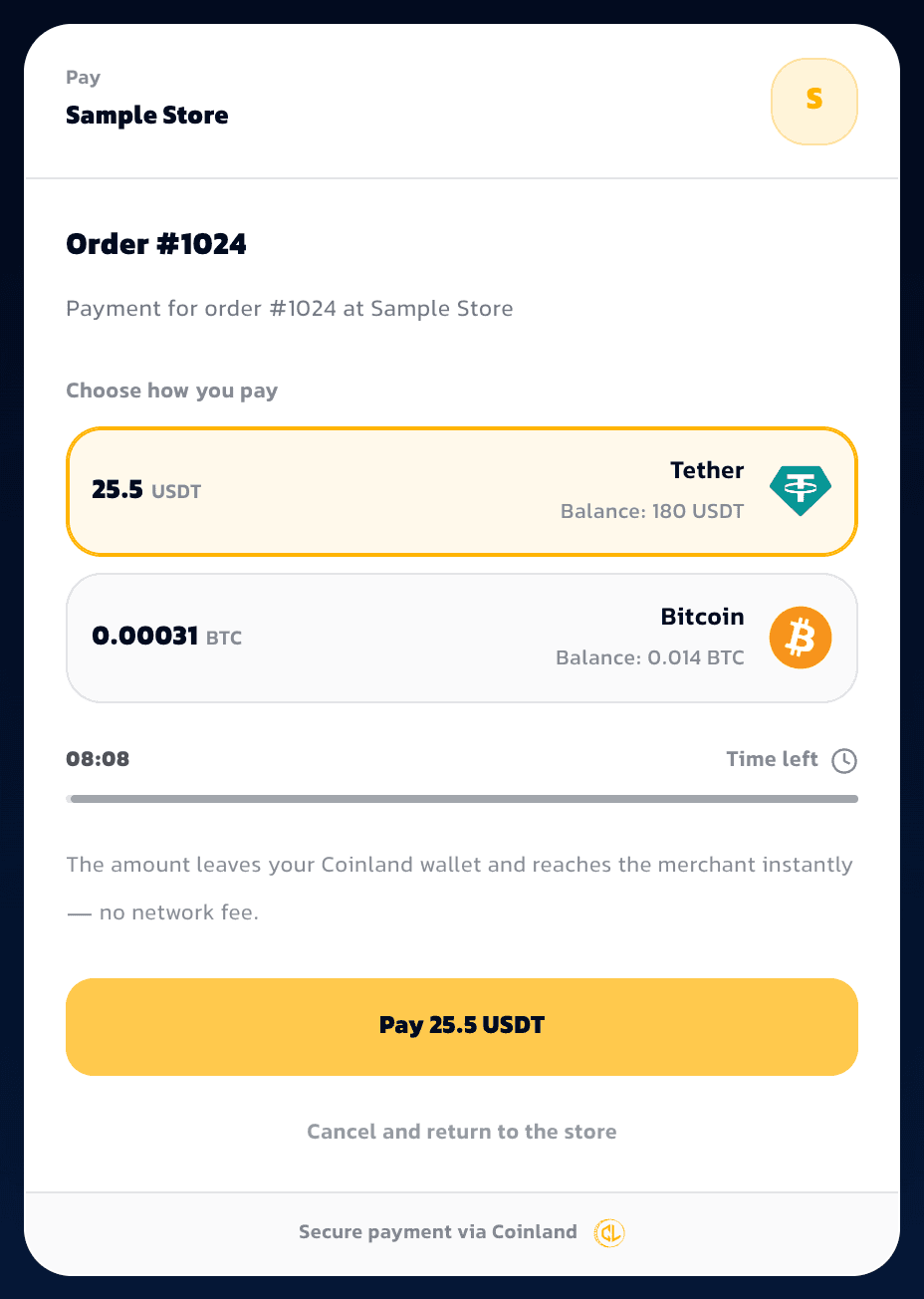
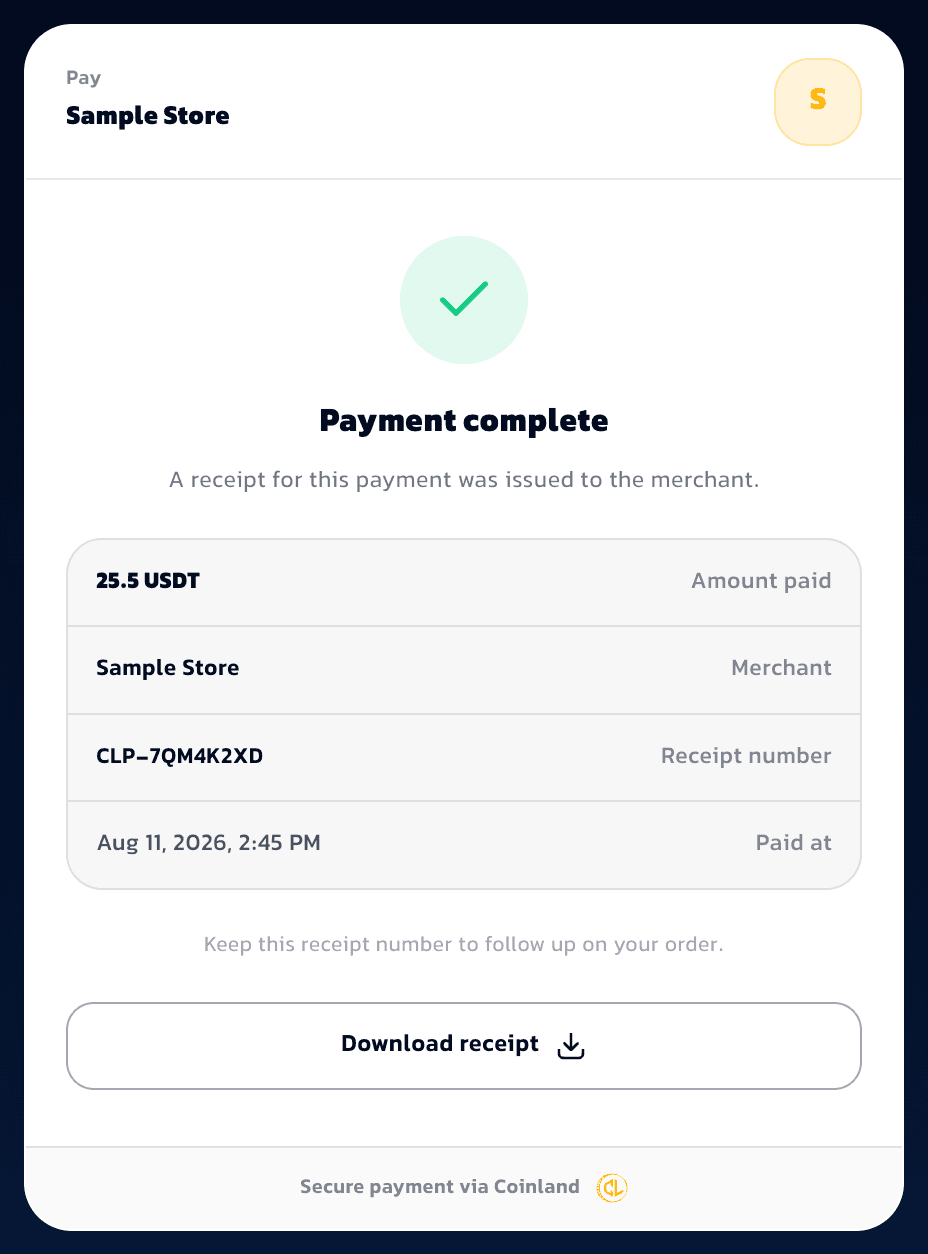
That capture shows the signed-in state. A customer who is not signed in to Coinland sees the same merchant header and order summary with a sign-in form beneath it, and lands on this screen once they authenticate. The merchant name, order number and receipt number in these captures are sample data; the layout, type and behaviour are the real page. The order title and description are the merchant's own single strings, so they appear as the merchant wrote them in either language.
The widget computes no money of its own. Every figure on it is a field it was handed, fixed when the session was created, and the total on the pay button is the same number the ledger debits. There is no client-side arithmetic that could disagree with the charge, and nothing on the page can drift between what the customer reads and what they pay.
What the customer sees depends on who carries the fee. Under fee_bearer: "merchant" they see one
number — the order amount — because the fee is yours and none of it is added to their total. Under
fee_bearer: "customer" the surcharge is shown as its own line, because they are being asked to pay
it. Your platform rate is never on this page in either case.
Three integration levels
| Level | You write | The customer sees | Use it when |
|---|---|---|---|
| 1. Hosted redirect | A 302 to checkout_url | Your page, then Coinland's | You want the least code, or you run no JavaScript |
| 2. Popup | CoinlandPay.open() | Your page, with Coinland over it | You want the customer to stay on your page |
| 3. Embedded inline | CoinlandPay.mount() | The order card in your page | You want the order visible in your own checkout |
They share one script, one session and one completion payload, so moving between them is a few lines. Start at level 1 and go up only when you want what the next level adds.
Level 1: hosted redirect
No JavaScript at all. The session response carries checkout_url; send a 302 to it.
import type { Request, Response } from "express";

const API = "https://my.coinlandexchange.com";

export async function startCheckout(req: Request, res: Response) {
  const order = await loadOrder(req.params.orderId);

  const session = await fetch(`${API}/api/pay/v1/sessions`, {
    method: "POST",
    headers: {
      Authorization: `Bearer ${process.env.COINLAND_PAY_KEY}`,
      "Content-Type": "application/json",
    },
    body: JSON.stringify({
      reference_id: order.id,
      title: `Order ${order.number}`,
      amounts: [{ currency: "usdt", amount: order.totalUsdt }],
      return_url: "https://example.com/checkout/done",
      cancel_url: "https://example.com/cart",
    }),
  }).then((r) => r.json());

  // Store the session id against the order BEFORE sending the customer away.
  await order.update({ paySessionId: session.id });

  res.redirect(302, session.checkout_url);
}
The customer pays, comes back to your return_url with ?receipt=<token>&payment_id=<id>, and your
webhook handler does the fulfilment. Nothing is lost by choosing this over the other two except the
customer staying on your page.
The embed script
Levels 2 and 3 need one script tag, no build step and no bundle:
<script src="https://my.coinlandexchange.com/pay/v1.js"></script>It defines a single global, CoinlandPay, and pulls in nothing else. Load it with defer in your
<head> or at the end of <body>.
Level 2: popup
CoinlandPay.open({
  sessionId: "3a7f21e8-9c04-4d6b-8e15-7b2a9f3c1d60",

  onComplete({ payment_id, receipt_no, receipt }) {
    // The customer paid. Advance your own UI, then reconcile server-side.
    window.location.href = `/checkout/done?payment_id=${payment_id}`;
  },

  onCancel() {
    // The popup was dismissed. The session is untouched and stays open until it
    // expires, so calling open() again with the same sessionId resumes it.
  },
});
Prop
Type
open() returns immediately. It does not resolve a promise on payment, because the popup may outlive
the page that opened it -- a customer who completes a payment after your tab is discarded still gets
their payment, and you still get the webhook.
Because open() may navigate away when a popup is blocked (see below), treat it as the last thing
your handler does. Do not queue work after it that has to run.
Level 3: embedded inline
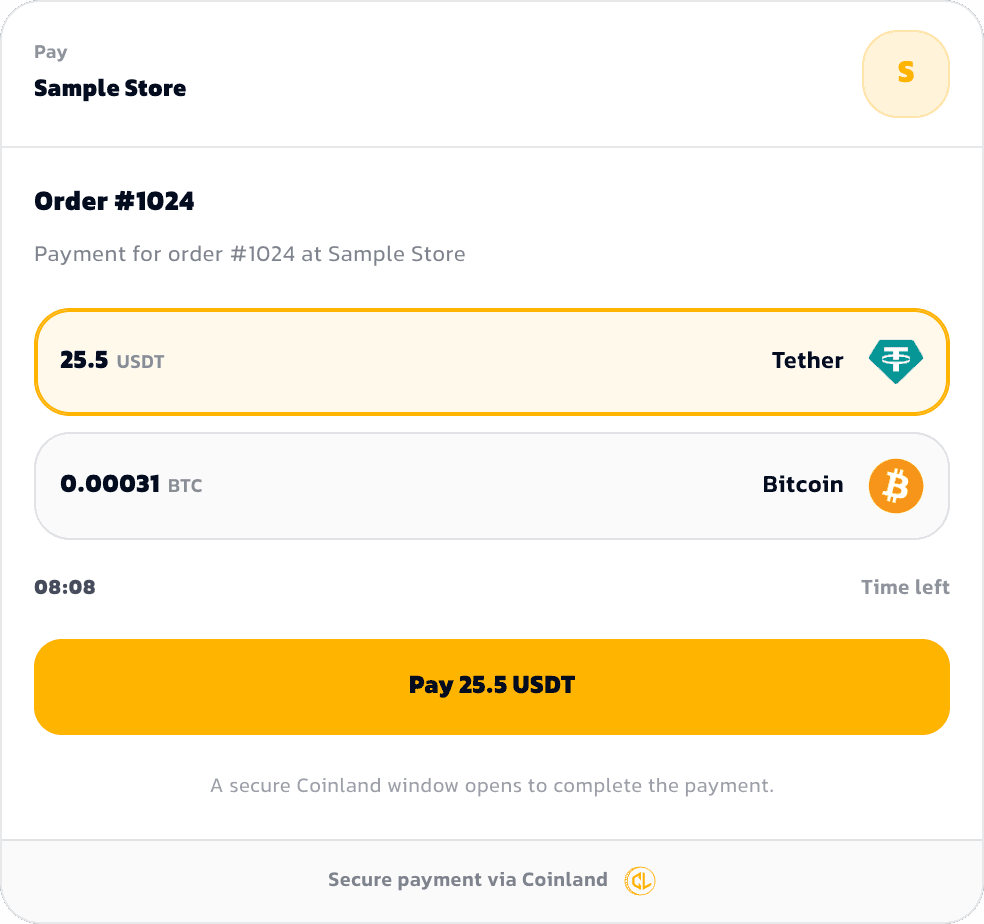
mount() renders the order card inside your page: your customer sees the branding, the amounts,
the coin options and the countdown without leaving your checkout. The card is an iframe pointing at
Coinland, and it is display-only -- pressing pay breaks out to the hosted page in a popup, exactly as
level 2 does.
<div id="coinland-pay"></div>

<script src="https://my.coinlandexchange.com/pay/v1.js"></script>
<script>
  CoinlandPay.mount(document.getElementById("coinland-pay"), {
    sessionId: "3a7f21e8-9c04-4d6b-8e15-7b2a9f3c1d60",

    onComplete({ payment_id, receipt_no, receipt }) {
      window.location.href = `/checkout/done?payment_id=${payment_id}`;
    },

    onCancel() {
      // The customer closed the payment window without paying. The card stays
      // mounted and the session stays open.
    },
  });
</script>
Prop
Type
Give the container a width and let the card fill it; it is responsive down to phone widths. If the
session is already completed, expired or canceled when it mounts, the card renders that state
instead of a pay button.
The relationship between the three levels is worth stating plainly: level 3 contains level 2. The
embedded card is a display surface, and the moment the customer commits, it opens the same hosted
page open() would have. If the popup is blocked, both levels fall back to the same full-page
redirect, and the customer returns to your return_url with ?receipt=<token>&payment_id=<id>
appended.
Your return_url must work at every level
Even if you only ever intend to use the popup or the embedded card, a customer with popups disabled
arrives at return_url instead of triggering onComplete. Build that page to read payment_id,
ask your own server about the order, and show a pending state if the webhook has not landed yet.
Why checkout is never fully inside your page
The embedded card is framed; the confirmation step never is. The checkout page at
https://my.coinlandexchange.com/pay/{sessionId} sends X-Frame-Options: DENY and
frame-ancestors 'none', so a browser refuses to render it inside your site. Only the display-only
embed route that mount() loads is frameable. Three independent reasons, and each one alone would
be enough:
- A customer cannot verify a framed login. The address bar shows your domain while the form asks
for Coinland credentials and a one-time code. There is no way to tell that frame apart from one you
drew yourself, which is precisely the shape of a phishing page -- and it trains customers to type
Coinland credentials into non-Coinland chrome. A popup keeps
my.coinlandexchange.comvisible in the address bar for the whole time they are authenticating, which is the one signal that actually protects them. - A parent page can watch a frame in ways it cannot watch a popup. Focus, keystroke timing and layout are observable from the embedder, and an overlay on top of a frame is the classic clickjacking attack: the customer believes they are clicking one thing and confirms another.
- It would not work anyway. Browsers now partition third-party cookies by the embedding site, so a Coinland session inside your page is not the Coinland session the customer already has. They would be asked to log in again, in the least trustworthy possible place, every single time.
The embed card is safe to frame precisely because it cannot move money. It displays a session that is already public to whoever holds its id, it takes no credential, and it has no authority to confirm anything. Everything that requires the customer to prove who they are happens on Coinland's origin, in a window whose URL they can read.
Handling the result
Whichever level you use, the result arrives the same way.
onComplete is a UI callback, not a settlement signal
It runs in the customer's browser and can be triggered by anyone with a console open. Use it to
advance your own UI. Fulfil the order from the webhook or from GET /payments/{id},
which are the only two things a customer cannot influence.
The ids can be empty, so never render them directly
There is a slow fallback path — the customer closed the payment window before it reported back —
where onComplete fires with payment_id, receipt_no and receipt all empty strings. Only
the fact of completion is known. A handler that puts receipt_no straight on the page shows a blank
where the receipt number should be, and nothing throws to tell you.
So treat the callback as "something finished, go and ask": look the payment up by your own
reference_id with GET /api/pay/v1/sessions/{reference_id} server-side, and render from that. This
is the same discipline the callback already demands for settlement — it just also applies to the
fields.
Internally the popup reports back with postMessage to window.opener, and the embedded card relays
the same message from its frame. The body is
{ source: "coinland-pay", type, sessionId, ... }, where type is payment_completed or
checkout_canceled. If you are handling messages yourself instead of using the script -- which you
should not need to -- the only rule that matters is the origin check:
window.addEventListener("message", (event) => {
  // Never skip this. Without it, any page in any tab can post you a fake
  // "payment_completed" and drive your UI.
  if (event.origin !== "https://my.coinlandexchange.com") return;
  if (event.data?.source !== "coinland-pay") return;
  // ...
});
The script also watches whether the payment window has been closed. A customer who closes it without
paying produces no message at all, so a closed-window poll is what turns that into onCancel.
Styling and branding
You cannot style the widget, because you cannot reach into it. What you can change lives in your
business console: display name, Persian display name and logo, all of which render above the order
title. The session's title and description are yours per order.
The widget is Persian and RTL by default for the Iranian market, and follows the customer's own language preference on Coinland rather than your page's.
Checklist
- The script tag points at
https://my.coinlandexchange.com/pay/v1.js, not a copy you host. return_urlandcancel_urlare https and both work when visited directly.- Your
return_urlpage tolerates arriving before the webhook does. - Nothing in
onCompletegrants access on its own. - You never try to iframe the checkout page itself -- only
mount()frames anything, and it frames the display card.